Understanding Transaction Hierarchies in Epicor Kinetic
- Dora Chavarria

- Jun 15
- 5 min read

One of the most common questions finance teams, controllers, and ERP administrators encounter when working in Epicor Kinetic is: "Why did this transaction post to that General Ledger account?"
When a transaction posts to an unexpected account, it is easy to assume something is wrong with the system. In reality, Epicor is often working exactly as configured. The challenge is understanding the logic the system follows when determining which account should be used. Behind every financial posting is a set of rules that guides Epicor through a series of accounting decisions. This process is known as the Transaction Hierarchy, and it plays a critical role in ensuring transactions are recorded consistently across the ERP.
Understanding transaction hierarchies can help organizations troubleshoot posting issues more effectively, improve financial accuracy, and gain greater confidence in their accounting configuration. Whether you are responsible for accounting, ERP administration, or day-to-day system support, a solid understanding of how Epicor selects GL accounts can save significant time when investigating posting discrepancies.
What Are Transaction Hierarchies?
Transaction hierarchies define the order in which Epicor Kinetic searches for a General Ledger account when a transaction occurs. Whenever a business event takes place, such as receiving inventory, processing an invoice, issuing material, or recording payroll activity, Epicor follows a predefined sequence of rules to determine the appropriate account for the transaction.
These rules are tied to posting processes and GL transaction types that control how activity from different modules is recorded in the General Ledger. Rather than relying on a single account source, Epicor evaluates multiple levels of configuration until it finds a valid account assignment. Once a valid account is identified, the search stops and that account is used for the posting.
This structured approach provides flexibility while maintaining consistency. It allows organizations to establish company-wide accounting standards while still supporting more specific account assignments when business requirements demand them.
How Epicor Searches for a GL Account
At a high level, Epicor follows a straightforward principle: the system searches from the most specific level to the most general level until a valid account is found.
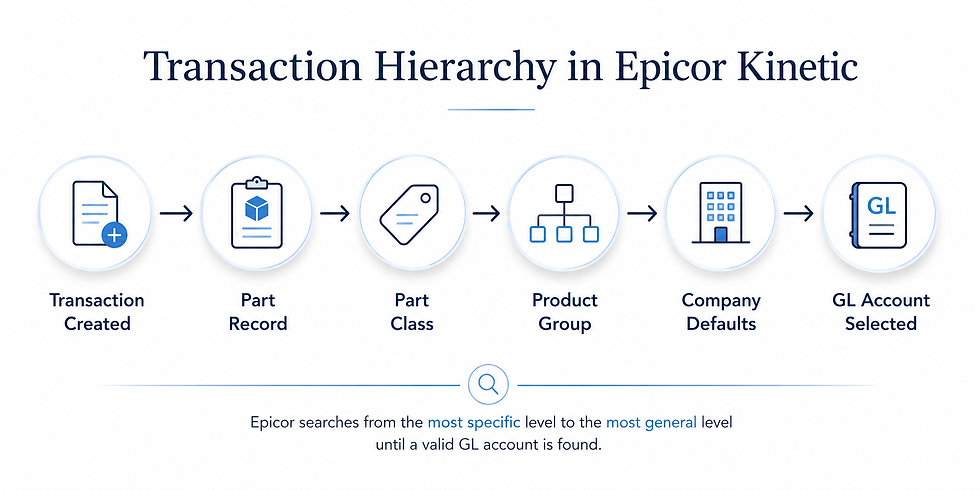
While the exact hierarchy varies depending on the transaction type and module involved, the concept remains the same. Epicor always attempts to use the most detailed accounting configuration available before moving to broader levels within the system. Understanding this principle is often the key to identifying why a transaction posted the way it did.
Why Transaction Hierarchies Matter
Many organizations encounter situations where transactions post to accounts that appear incorrect or unexpected. In most cases, the issue is not a system error but rather a misunderstanding of how Epicor navigates the hierarchy to locate an account.
When users understand where Epicor is looking for account information, troubleshooting becomes much easier. Instead of searching through multiple configurations without direction, teams can systematically review each level of the hierarchy until they identify the source of the posting.
Understanding the hierarchy helps organizations:
Troubleshoot posting issues more efficiently
Configure GL Control Codes correctly
Improve accounting consistency across departments
Reduce manual journal corrections
Strengthen financial reporting accuracy
Simplify audit and compliance activities
For organizations with multiple business units, warehouses, product lines, or accounting structures, understanding transaction hierarchies becomes increasingly important.
Where to Find Transaction Hierarchies in Epicor
Epicor provides detailed hierarchy documentation within the Help system and General Ledger documentation. These resources outline the hierarchy rules used for various transaction types across modules such as Accounts Payable, Accounts Receivable, Inventory Management, Deferred Revenue, Payroll, and Asset Management.
While many users focus primarily on transaction processing, reviewing the hierarchy documentation can provide valuable insight into how Epicor determines account assignments behind the scenes. This knowledge is especially useful when implementing new processes, troubleshooting posting issues, or reviewing accounting configurations.
Example: Determining the GL Account for an Inventory Transaction
Let's look at a practical example involving a purchase order transaction.
Suppose a purchase order contains the following information:
Buy For: Inventory
Part Class: Steel
After the transaction is processed, Epicor generates a debit entry to a specific General Ledger account. To understand why that account was selected, we need to follow the hierarchy used for inventory transactions.
The first place Epicor looks is the Part Master. If a GL Control Code is assigned directly to the part, Epicor uses that configuration to determine the account and stops searching. Because this is the most specific level available, it takes precedence over broader accounting configurations elsewhere in the system.
If no GL Control Code exists at the part level, Epicor moves to the next level in the hierarchy and evaluates the Part Class. In this example, the part belongs to the Steel part class. If the Steel part class contains a valid GL Control Code, Epicor uses the account configuration associated with that code.
Once Epicor identifies a valid GL Control Code, it references the account mappings associated with that code and selects the appropriate inventory, expense, asset, or liability account based on the transaction being processed. Because a valid account was found at the Part Class level in this example, Epicor stops searching and uses that account for the posting.
This example highlights one of the most important concepts in transaction hierarchies: Epicor continues moving through the hierarchy only until a valid account source is found.
The "Most Specific Wins" Principle
One of the easiest ways to understand transaction hierarchies is to think of them as a series of fallback options. Epicor always attempts to use the most specific accounting configuration available before considering broader alternatives.
For example, the system may evaluate account assignments in the following order:
Part-Level Configuration
Part Class Configuration
Product Group Configuration
Company-Level Defaults
The system evaluates each level in sequence until it locates a valid account source. Once a valid account is found, the search ends. This approach allows organizations to maintain standardized accounting practices while still supporting exceptions and specialized requirements where necessary.
Understanding this concept can dramatically reduce the time required to investigate posting issues because it provides a logical roadmap for tracing where account assignments originate.
Common Challenges Organizations Face
Several common accounting issues can often be traced back to transaction hierarchy configuration. Transactions posting to unexpected accounts, missing GL Control Codes, inconsistent account assignments, and difficulty identifying the source of a posting are among the most frequent challenges organizations encounter.
In many cases, the hierarchy itself is functioning exactly as designed. The issue lies within the underlying configuration. A missing control code, an outdated account mapping, or an overlooked configuration change can cause Epicor to pull account information from a different level of the hierarchy than originally intended.
Regular reviews of posting rules, GL Control Codes, and account mappings can help organizations identify these issues before they affect financial reporting. Maintaining clear documentation of accounting configurations can also make troubleshooting significantly easier when questions arise.
Final Thoughts
Transaction hierarchies are one of the most important, yet often overlooked, components of Epicor Kinetic's accounting framework. They provide the structure that determines how financial transactions are classified and recorded throughout the system.
By understanding how Epicor evaluates GL Control Codes and navigates hierarchy levels, finance and ERP teams can troubleshoot issues more efficiently, improve accounting consistency, and strengthen overall financial controls. More importantly, they can gain greater visibility into the decision-making process behind every posting, helping ensure the ERP system accurately reflects the organization's financial operations.
For organizations looking to improve financial accuracy and reduce posting-related issues, understanding transaction hierarchies is a valuable step toward building a more reliable and well-governed Epicor environment.


Comments